
Picking a name for your new business is easy fun. At least until you see another business already has rights to the name. This is a straightforward decision where search engines such as Google or Facebook are concerned. Your business name can be similar or identical to other existing trademarks. This is exactly when you have to check registered trademark.
Key Takeaways
Similarities in names could result in costly rebranding, litigation, and even refusal to register the business name. It is necessary to make sure the name is clear before making any investments in brand development. The initial search is useful as an initial step. It still remains unclear regarding the determination of the legality of use of a certain name.
Trademark rights can be obtained on the basis of using the name commercially, without being officially registered as trademark rights with the federal agency. The best way to do it is through a combination of a search of the database and an investigation of the actual usage of similar names by other companies.
Protect your business from competitors!
Contact John Rizvi for advice on trademark protection of your organization. We will help you check registered trademark and come up with a unique name for your business.
Steps to Determine Whether a Brand Is Already in Use
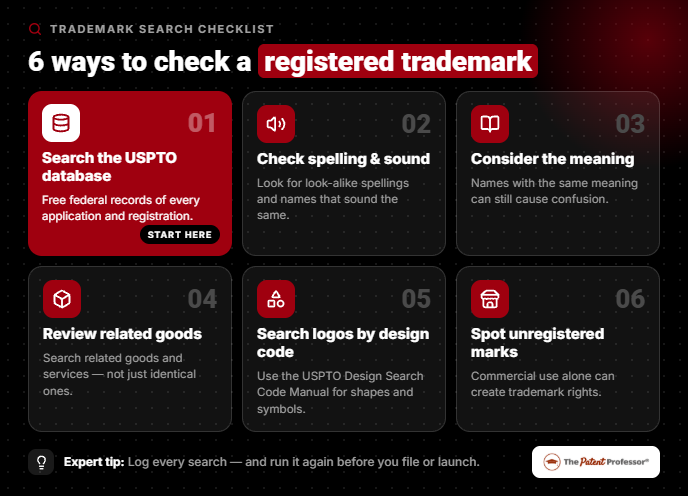
It is advisable to begin with an official database of the United States Patent and Trademark Office (USPTO), its Trademark Search, which allows you to search free of charge federal trademark applications and registrations.
Go to the USPTO Trademark Search service and perform the following steps:
- Type the same name: Enter a proposed brand name and look through the results found.
- Look up alternatives: Find other variations in terms of different spelling, phonetic sound, abbreviations, and single words from the proposed name.
The best way to do it is through a combination of a search of the database and an investigation of the actual usage of similar names by other companies.
Discover some possible sources for further investigation. View the necessary records to find out about the ownership, applications, and the status of the mark(s).
The USPTO advises widening your search to include indirect hits.
Expert Tip
“Keep track of your searches in a file. Do the same thing once more before filing your application or branding your business. It keeps you updated and saves you from needless trouble.”

Kevin Noonan
Trademark Attorney
Free Tools to Check the Status of a Trademark
Brand investigation does not require special programs to begin with.
| Tool | What it helps you check |
| USPTO Trademark Search | Federal applications and registrations |
| USPTO TSDR | Application status and official records |
| Google Search | Existing businesses and commercial use |
| State business registries | Business names registered within a state |
| Domain registrars and social platforms | Domain and username availability |
Please bear in mind that these two approaches are different. The availability of a domain does not mean that its name can be legally used as a trademark. Registering the business in the state will not necessarily solve the problem of trademarks.
Checking Whether Your Logo Has Already Been Trademarked
Logos are checked through another strategy. Searching for words included in logos can miss similar images that are based on other words.
The USPTO has prepared a Design Search Code Manual to facilitate searches of visual elements of trademarks. The user can use related design codes to search for similar elements, for example, animals, shapes, symbols, or objects.
List the attributes of the logo prior to the search process. Consider how the logo looks and is arranged.
The USPTO has an image search facility available on their website. The use and terms associated with it might change over time.
Best to recheck your trademark!
Rechecking your trademark name can help you save a lot of hassle. John Rizvi can guide you well on that and suggest a distinctive name your brand deserves.
Conclusion
To check registered trademark is to keep your brand safe. Conduct a search for any similar marks in the USPTO database. Look into stuff that accompany the trademarks and see how other businesses use their trademark. Pay attention to design features and classes. It may be worth conducting a complete clearance search first.